※ 일본의 한 블로그 글을 번역한 포스트입니다. 오역 및 의역, 직역이 있을 수 있으며 틀린 내용은 지적해주시면 감사하겠습니다.
GitHub Copilot은 표준 기능만으로도 충분히 강력하지만, 「커스텀 지침」를 사용하는 것으로, 보다 개별적인 프로젝트의 요건에 따른 코드 생성을 실시할 수 있게 된다. 또한 MCP(Model Context Protocol) 서버와의 연계를 통해 외부 소스를 활용하여 Copilot 제안의 폭과 질을 높일 수 있다.
이러한 고급 기능에 대한 개요, 설정 방법 및 구체적인 이용 예를 설명하려고 한다.
1. 커스텀 지침으로 Copilot을 커스터마이즈
GitHub Copilot은 뛰어난 코드 완성과 생성을 제공하지만 기본적으로 프로젝트 특정 규칙이나 코딩 스타일을 따르지는 않는다.
사용자 커스텀 지침은 Copilot의 내용 출력을 사용자 또는 팀의 코딩 규칙, 기술 스택 및 프로젝트 요구 사항에 맞게 조정할 수 있는 강력한 기능이다.
이 장에서는 사용자 지정 지침과 프롬프트 파일을 사용하여 코드 완성 및 코드 생성이 요구 사항에 맞게 출력이 되도록 사용자 지정하는 방법을 설명한다.
1.1 settings.json의 설정
settings.json을 사용하여 사용자 커스텀 지침을 지정할 수 있다.
설정할 수 있는 내용은 다음과 같다.
설정 내용설정 이름
| 코드 생성 | github.copilot.chat.codeGeneration.instructions |
| 테스트 생성 | github.copilot.chat.testGeneration.instructions |
| 코드 리뷰 | github.copilot.chat.reviewSelection.instructions |
| 커밋 메시지 생성 | github.copilot.chat.commitMessageGeneration.instructions |
| 끌어오기 요청 제목 및 설명 생성 | github.copilot.chat.pullRequestDescriptionGeneration.instructions |
예를 들어, 생성되는 커밋 메시지가 기본 영어이기 때문에 불편할 수 있다. 이 경우 다음과 같이 settings.json으로 설정할 수 있다.
  "github.copilot.chat.commitMessageGeneration.instructions": [
    { "text": "반드시 한국어로 간결하게 작성하십시오"}
  ],
커밋 메시지를 생성하면, 지금까지는 영어로 출력되었지만, 한국어로 출력되게 된다.
1.2 코드 생성 커스텀 지침의 변경
이전 섹션에서는 settings.json을 사용하여 사용자 지정 지침을 지정하는 방법에 대해 설명했다. 이 절에서는 코드 생성에 특화된 커스텀 지침을 설정하는 방법에 대해 설명하도록 하겠다.
코드 생성 지시 파일 형식
코드 생성 지시 파일은 두 가지가 있다.
파일설명
| .github/copilot-instructions.md | 작업공간에 대한 모든 지시사항을 포함하는 단일 지시문 파일이다. 이러한 안내는 모든 채팅 요청에 자동으로 포함된다. |
| .instructions.md | 특정 작업에 대한 사용자 커스텀 지침이 포함된 하나 이상의 프롬프트 파일입니다. 채팅 요청에 개별 프롬프트 파일을 첨부하거나 특정 파일이나 폴더에 자동으로 첨부되도록 설정할 수 있다. |
두 파일을 모두 사용하여 커스텀 지침을 사용할 수 있다. 다만 이 경우 두 가지 지침이 충돌하지 않도록 주의할 필요가 있다. 그리고, 이러한 지시 파일은 코드 생성시에 사용되지만. 코드 보완에는 사용되지 않는다.
전제로 이 프로젝트별 커스텀 지침을 만든다. 프로젝트마다 기술 스택이나 버전 등이 다른 경우가 많으니, 이 방법이 실무에선 일반적이라고 생각된다. 물론 VS Code 전체에 커스텀 지시를 설정할 수도 있지만, 여기서는 그 설명을 생략하도록 하겠다.
커스텀 지침 추가
여기서 취급하는 지시 파일은 .instructions.md으로, 이 파일만 사용해 커스텀 지침을 하는 방법을 설명하도록 하겠다.
.instructions.md 커스텀 지침 파일은 두 섹션으로 구성된다.
섹션설명
| 메타데이터가 포함된 헤더(프론트마터 형식) | 지침를 자동으로 적용하는 파일의 glob 패턴을 지정한다. 맞춤 지침을 항상 포함하려면 ** 패턴을 사용한다. |
| 지시 내용의 본문 | Markdown 형식을 사용하여 자연어로 사용자 지정 지침을 지정한다. 제목, 목록 및 코드 블록을 사용하여 지침을 구조화할 수 있다. |
예를 들어, 다음 파일을 작성하여 커스텀 지침을 수행할 수 있다.
파일 이름설명
| general-coding.instructions.md | 모든 코드에 적용되는 일반 맞춤 지침을 제공. |
| typescript-react.instructions.md | TypeScript 및 React에 대한 사용자 커스텀 지침을 제공. |
다른 적용할 파일을 추가하려면 원하는 파일을 추가할 수 있다.
settings.json 설정
settings.json에 위에서 작성한 두 가지 파일을 다음과 같이 추가한다.
"github.copilot.chat.codeGeneration.instructions": [
  {
    "file": "general.instructions.md"
  },
  { "file": "typescript-react.instructions.md" }
],
Copilot은 이제 두 파일이 코드 생성에 대한 커스텀 지침이 담겨 있는 파일로 인식하게 된다.
지시 파일 저장
그리고 그 두 가지 파일을 위치는 아래 디렉토리에 저장하면 된다.
.github/
└── instructions/
      ├── general-coding.instructions.md
      └── typescript-react.instructions.md
general-coding.instructions.md 파일
여기에서는 GitHub Copilot에 대한 커스텀 지침 파일을 만드는 방법에 대해서 설명하도록 하겠다. 앞에서 언급했듯이 파일은 .github/copilot-instructions.md헤더와 지시 내용의 본문으로 구성되어 있는지 사전에 확인하길 바란다.
제시된 프롬프트는 공식 사이트 샘플을 기반으로 생성 AI에 가상 사용 사례를 설정하여 샘플로 만든 것이다.
이것은 어디까지나 샘플이므로, 실제 프로젝트의 코딩 규약이나 기술 스택에 맞추어 적절히 변경해 사용하길 바란다.
필자가 사용자 지정 지침을 만들 때 프로젝트의 기술 스택과 요구 사항, 각 라이브러리 버전 및 코드 스 니펫을 설명하는 기본 프롬프트를 만든 후,이를 생성 AI에 넣고 프롬프트를 브러시 업하여 완성한다.
---
applyTo: "**"
---

# General Coding Best Practices

## Code Quality & Maintainability
- Write self-documenting code with clear variable and function names
- Limit function length to 30 lines max, break larger functions into smaller ones
- Follow does one thing well
- Use meaningful comments for "why" not "what" (code should explain itself)
- Apply consistent indentation and formatting throughout the codebase
- Avoid nested conditionals deeper than 3 levels - refactor when necessard
-
Impact numbers and strings - use named constants instead

## Performance & Optimization
- Optimize for readability first, then performance if needed
- Avoid premature optimization - measure before optimizing
- Use appropriate data structures for the task (consider time/space complexity
) datasets
- Implement lazy loading where appropriate for better initial load times
- Consider pagination for large result sets

## Security Practices
- Never trust user input - always validate and sanitize
- Implement proper authentication and authorization
- Use parametrized queries to
prevent (keys, passwords)
- Follow the principle of least privilege
- Set appropriate CORS policies
- Implement rate limiting for APIs

## Modern Development Practices
- Use async/await for asynchronous operations instead of callbacks - Apply
functional
programming techniques
- Implement proper logging for monitoring and debugging
- Use environment variables for configuration
- Follow semantic versioning for releases
- Write useful commit messages explaining the "why" of changes
## Project Structure
- Maintain a clear, logical project structure
-
Useap concerns between layers (presentation, business logic, data access)
- Organize code by feature rather than by technical function when appropriate
- Create reusable, modular components
- Use dependency injection to manage dependencies
## When Generating Code
- Generate code
that
follow Add helpful comments for complex logic


- Include examples of usage when generating functions or classes
- Ensure backward compatibility unless explicitly requested otherwise
- Suggest unit tests for critical functionality
- Provide optimization tips for resource-intensive operations
typescript-react.instructions.md 파일
typescript-react.instructions.md파일은 TypeScript 및 React에 대한 커스텀 지침을 기재한다.
---
applyTo: "**/*.ts,**/*.tsx"
---
# TypeScript & React Best Practices
Apply the [general coding guidelines](./general-coding.instructions.md) to all code.
## TypeScript Guidelines
- Use strict TypeScript configuration with `strict:
true` return values
- Use interfaces for objects that represent entities, types for simpler constructs
- Leverage TypeScript utility types (Pick, Omit, Partial, Required, etc.)
-
Avoid using `any` - use `unknown` with type guards when type is
uncertain discriminated unions for handling state with different shapes
- Create generic components and functions when appropriate
- Define proper typing for API responses and requests
- Use enums for fixed sets of related values - Properly handle nullable types with
optional
chaining (?.com) complex types and non-obvious behavior
## React Fundamentals
- Use functional components with hooks instead of class components
- Apply proper dependency arrays in useEffect and useMemo hooks
- Extract business logic to custom hooks for reusability -
Memoize
expensive calculations React.memo for pure components
- Use useCallback for functions passed to child components
- Implement controlled components for form inputs
- Pass only required props to components (avoid prop drilling)
- Avoid direct DOM manipulation - use refs when necessary
-
Keep
components small Use useState for simple component-level state
- Implement useReducer for complex state logic
- Apply useContext for sharing state across component trees
- Consider global state management only when necessary (Redux, Zustand, Jotai) - Keep state as close as close as
possible
to where it
- Minimize state duplication and ensure single source of truth
- Normalize complex state structures for better performance
## Component Design
- Create atomic, reusable components
- Implement proper prop validation with TypeScript
- Use composition over inheritance
- Design components with accessibility in mind
-
Support keyboard naviga styled-components
- Follow responsive design principles
- Use CSS modules or styled-components for component styling
- Implement lazy loading for larger components with React.lazy
## React Performance Optimization
- Virtualize long lists with react-window or react-virtualized
-
Implement code splitting with dynamic using index as key)
- Avoid inline function definitions in render
- Properly handle cleanup in useEffect to prevent memory leaks
- Use debouncing/throttling for frequently firing events
- Implement memoization judiciously
## Testing in React & TypeScript
-
Writing for accessibility with axe-core or similar tools
- Use TypeScript to ensure prop types are correct
- Test custom hooks with renderHook
- Implement integration tests for complex workflows
- Mock external dependencies in tests
- Use snapshot testing sparingly
## React & API Integration
- Implement proper
- data fetching and caching
- Handle optimistic updates for better UX
- Properly type API responses with TypeScript interfaces
- Implement retry logic for failed requests
- Add cancellation for abandoned requests여담입니다만, 생성 AI 에 지시를 내는 프롬프트는, 영어로 서술하는 쪽이 정밀도가 높은 회답을 얻을 수 있다고 하는 검증 결과가 있으므로 커스텀 지침에 대해서도 영어로 작성함이 보다 정밀도 높은 코드를 기대할 수 있다.
2. MCP (Model Context Protocol)를 통한 기능 확장
VS Code는 버전 1.99.0 에서 에이전트 모드를 지원했다. 이를 통해 웹 콘텐츠 검색, 심볼 참조 검색 및 고급 사고 처리가 가능하게 됐다. 또한 MCP 클라이언트로 작동하며 다양한 MCP 서버와의 연계도 가능하다. MCP 서버는 AI를 활용한 강력한 개발 지원 도구이다. 따라서이 장에서는 MCP 서버를 사용하여 개발을 효율화하고 획기적으로 가속화하는 절차를 설명하도록 하겠다.
2.1 에이전트 모드 정보
에이전트 모드, VS Code 버전 1.99에서 새로 추가된 GitHub Copilot의 매우 강력한 기능 중 하나다. 이 기능을 사용하면 Copilot이 코드베이스를 깊이 이해하고 복잡한 작업을 자율적으로 실행할 수 있다. 에이전트 모드에 대한 자세한 설명은 여기에서 생략하지만 더 자세한 정보는 공식 사이트 를 참조하길 바란다.
2.2 MCP 개요
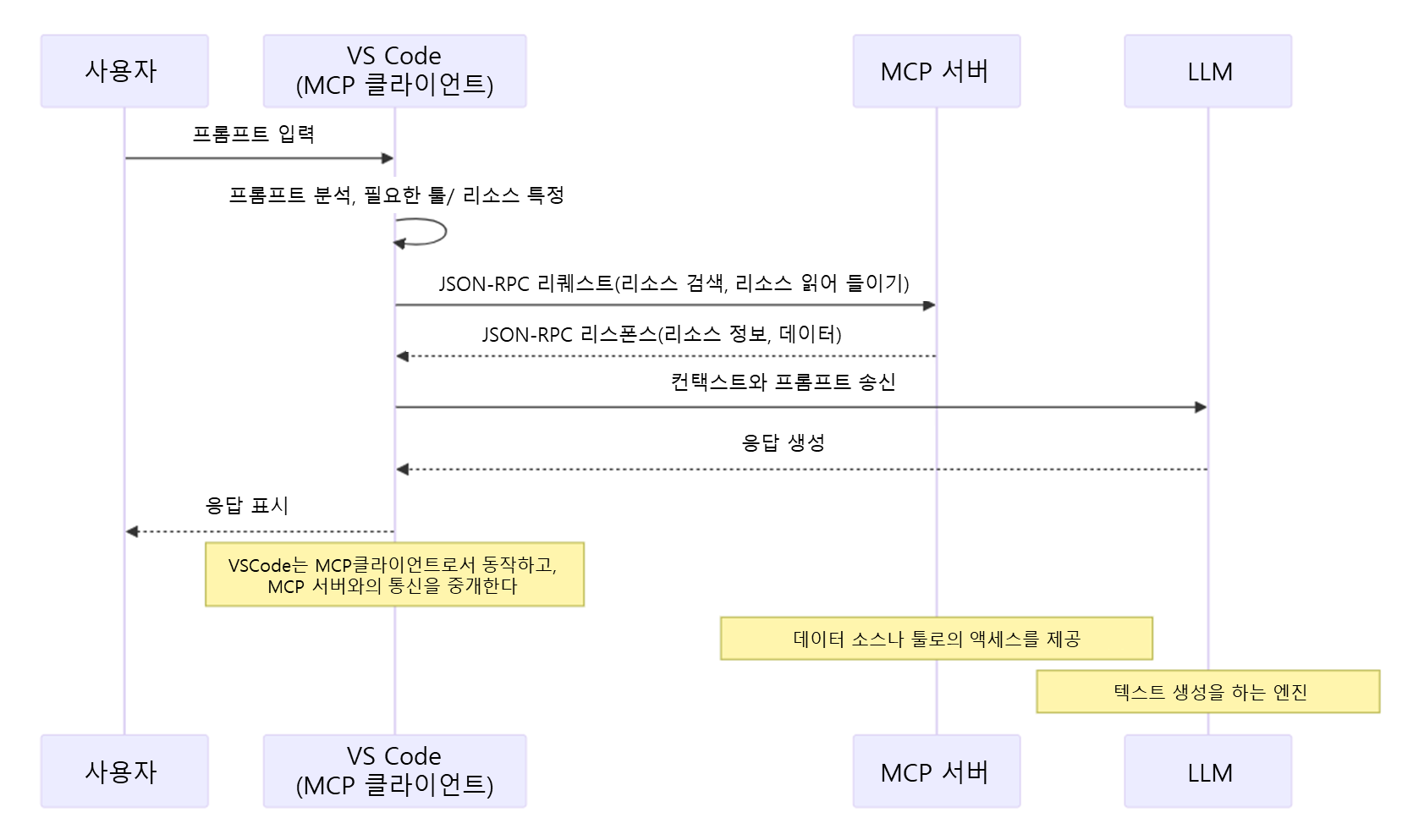
MCP는 AI 모델과 외부 데이터 소스 및 도구 간의 연결을 용이하게 하는 개방형 표준이다.
이 프로토콜은 2024년 11월에 Anthropic에 의해 발표됐다. 과거에는 AI 모델을 외부 서비스와 연결하려면 각 시스템에 맞는 별도의 API 연결을 개발해야 했으나 MCP를 사용하면 단일 표준화된 프로토콜을 통해 다양한 서비스 및 도구와의 연동이 가능하게 됐다. 이를 통해 개발자는 특정 AI 모델 및 플랫폼에 대한 종속성을 줄이고 AI 애플리케이션을 보다 유연하고 효율적으로 구축할 수 있게 됐다.
주목해야 할 점은 사용자가 VS Code와 같은 지원 응용 프로그램에서 사용하려는 MCP 서버를 임의로 설정할 수 있다는 점이다. 이를 통해 사용자는 자신의 요구에 맞게 AI 기능을 유연하게 확장할 수 있다. 참고로 MCP의 동작은 다음과 같다.
2.3 MCP 서버 설정
MCP 유형
개발을 편안하게 만드는 MCP는 많이 존재한다. 예를 들어 웹 검색 MCP에는 Brave Search 및 Tavily가 있으며, 웹 사이트를 효율적으로 크롤링하고 데이터를 추출하는 Firecrawl MCP, 브라우저 자동화 도구와 연계하는 Playwright MCP, 디자인 분야에서는 Figma와 연계하는 Figma MCP 등도 이용할 수 있다.또한 파일 시스템과 함께 작동하는 Filesystem MCP와 GitHub와 함께 작동하는 GitHub MCP와 같은 다양한 MCP가 있다.
필자의 최근 추천으로는 Context7 이라는 MCP이다. 생성 AI는 때로는 오래된 정보의 코드를 제안하는 경우가 있다. 그 이유는 생성 AI가 보유한 정보가 특정 기간까지의 정보로 제한되며 최신 정보를 따르지 않는 "지식 차단" 때문입니다. 이 문제를 보완하는 것이 Context7 로, 이것을 사용하는 것으로, 항상 최신버젼의 문서나 코드 예에 근거한 제안을 기대할 수 있게 된다. 대응하고 있는 문서에 대해서는, Context7 의 공식 사이트 를 참조해 주시길 바란다.
이 절에서는이 Context7을 설정하는 절차에서 설명하도록 하겠다.
MCP 설정
MCP를 구성하는 방법에는 여러 가지가 있지만 여기에서는 로컬에서 MCP를 작동시키는 방법에 대해 설명하도록 하겠다. settings.json에서 다음 설정을 수행한다.
 "mcp": {
    "servers": {
      "Context7": {
        "type": "stdio",
        "command": "npx",
        "args": ["-y", "@upstash/context7-mcp@latest"]
      }
    }
  },
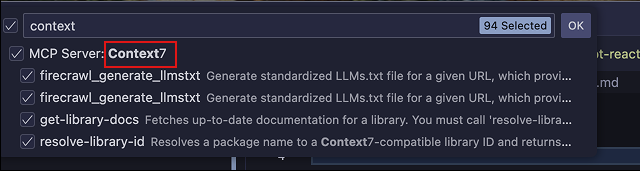
이것으로 설정이 완료이다. 설정되어 있는지 확인하려면. 채팅을 에이전트 모드로 변경한후 툴 모양의 아이콘을 클릭하면된다. 표시된 목록중 VS Code의 맨 위에 Context7이 표시되어 있다면 성공적으로 설정된 것이다.
사용 방법의 예로 에이전트 모드에서 Context7 MCP를 사용하도록 지시하여이 기능을 사용할 수 있다. React 19에서 새로 추가된 useActionState 훅을 사용한 샘플 코드 작성을 요청하는 경우를 테스트 해봤는데, 사용하지 않는 경우 독자적으로 관련 함수를 구현하는 코드를 제시하였고 사용한 경우 AI는 React의 최신 문서를 참조한 useActionState의 올바른 샘플 코드를 예상대로 출력하였다 (코드에 대한 자세한 내용은 여기에서 생략).
개발 환경을 편하게 하는 MCP 서버는 여기에서 소개한 것 이외에도 다수 있으니 꼭 자신의 환경에서 몇 가지 시험해, 최적인 것을 선택해, 개발 환경의 커스터마이즈를 즐겨 보길 바란다.
참고 링크
참고자료
'IT > 코딩툴' 카테고리의 다른 글
| GitHub Copilot을 현명하게 사용하는 컨텍스트 전략 (0) | 2026.08.02 |
|---|---|
| GitHub Copilot의 토큰 소비량을 줄이기 위한 사용 방법 (0) | 2026.07.26 |
| Claude 101 (0) | 2026.05.16 |
| VSCode(Visual Studio Code)의 GitHub Copilot SKILL.md (0) | 2026.02.25 |
| VSCode(Visual Studio Code)의 GitHub Copilot를 활용하는 6가지 방법 (0) | 2025.10.04 |